ShopDreamUp AI ArtDreamUp
Deviation Actions


![[WIP] RainDroid 2](https://images-wixmp-ed30a86b8c4ca887773594c2.wixmp.com/f/32b143c9-74f2-43ac-b3f9-32a6592fbdd5/damr6ld-8c9cbb71-a269-4e6c-82e2-c4df9665a643.png/v1/crop/w_92,h_92,x_14,y_0,scl_0.087619047619048,q_70,strp/_wip__raindroid_2_by_scoobsti_damr6ld-92s.jpg?token=eyJ0eXAiOiJKV1QiLCJhbGciOiJIUzI1NiJ9.eyJzdWIiOiJ1cm46YXBwOjdlMGQxODg5ODIyNjQzNzNhNWYwZDQxNWVhMGQyNmUwIiwiaXNzIjoidXJuOmFwcDo3ZTBkMTg4OTgyMjY0MzczYTVmMGQ0MTVlYTBkMjZlMCIsIm9iaiI6W1t7ImhlaWdodCI6Ijw9MTA1MCIsInBhdGgiOiJcL2ZcLzMyYjE0M2M5LTc0ZjItNDNhYy1iM2Y5LTMyYTY1OTJmYmRkNVwvZGFtcjZsZC04YzljYmI3MS1hMjY5LTRlNmMtODJlMi1jNGRmOTY2NWE2NDMucG5nIiwid2lkdGgiOiI8PTE2ODAifV1dLCJhdWQiOlsidXJuOnNlcnZpY2U6aW1hZ2Uub3BlcmF0aW9ucyJdfQ.r4VoVuqjMrIxwfqb4aWy-s5Ajac4EuwZr9DVnmVMjgI)
![[WIP] Android L for Rainmeter - Lock Screen](https://images-wixmp-ed30a86b8c4ca887773594c2.wixmp.com/f/32b143c9-74f2-43ac-b3f9-32a6592fbdd5/d7o420r-3347be4f-d405-476c-a999-f74a753500b9.png/v1/crop/w_92,h_92,x_14,y_0,scl_0.087619047619048,q_70,strp/_wip__android_l_for_rainmeter___lock_screen_by_scoobsti_d7o420r-92s.jpg?token=eyJ0eXAiOiJKV1QiLCJhbGciOiJIUzI1NiJ9.eyJzdWIiOiJ1cm46YXBwOjdlMGQxODg5ODIyNjQzNzNhNWYwZDQxNWVhMGQyNmUwIiwiaXNzIjoidXJuOmFwcDo3ZTBkMTg4OTgyMjY0MzczYTVmMGQ0MTVlYTBkMjZlMCIsIm9iaiI6W1t7ImhlaWdodCI6Ijw9MTA1MCIsInBhdGgiOiJcL2ZcLzMyYjE0M2M5LTc0ZjItNDNhYy1iM2Y5LTMyYTY1OTJmYmRkNVwvZDdvNDIwci0zMzQ3YmU0Zi1kNDA1LTQ3NmMtYTk5OS1mNzRhNzUzNTAwYjkucG5nIiwid2lkdGgiOiI8PTE2ODAifV1dLCJhdWQiOlsidXJuOnNlcnZpY2U6aW1hZ2Uub3BlcmF0aW9ucyJdfQ.p6pgjSufgxEBVBPc7l5O1FwZZCngewpe1Zok_krne5Y)


Suggested Deviants


Suggested Collections


![Omnimo 6.0 for Rainmeter [Outdated]](https://images-wixmp-ed30a86b8c4ca887773594c2.wixmp.com/i/9a1e44ad-d8a6-484b-91a3-ccc9c064e06b/d6qp7f8-e6aa9d58-004a-4f90-85fd-ba68007aaf90.jpg/v1/crop/w_184,h_184,x_0,y_23,scl_0.184,q_70,strp/omnimo_6_0_for_rainmeter__outdated__by_fediafedia_d6qp7f8-92s-2x.jpg)
![Omnimo 6.0 for Rainmeter [Outdated]](https://images-wixmp-ed30a86b8c4ca887773594c2.wixmp.com/i/9a1e44ad-d8a6-484b-91a3-ccc9c064e06b/d6qp7f8-e6aa9d58-004a-4f90-85fd-ba68007aaf90.jpg/v1/crop/w_92,h_92,x_0,y_12,scl_0.092,q_70,strp/omnimo_6_0_for_rainmeter__outdated__by_fediafedia_d6qp7f8-92s.jpg)


You Might Like…


Featured in Groups





Description
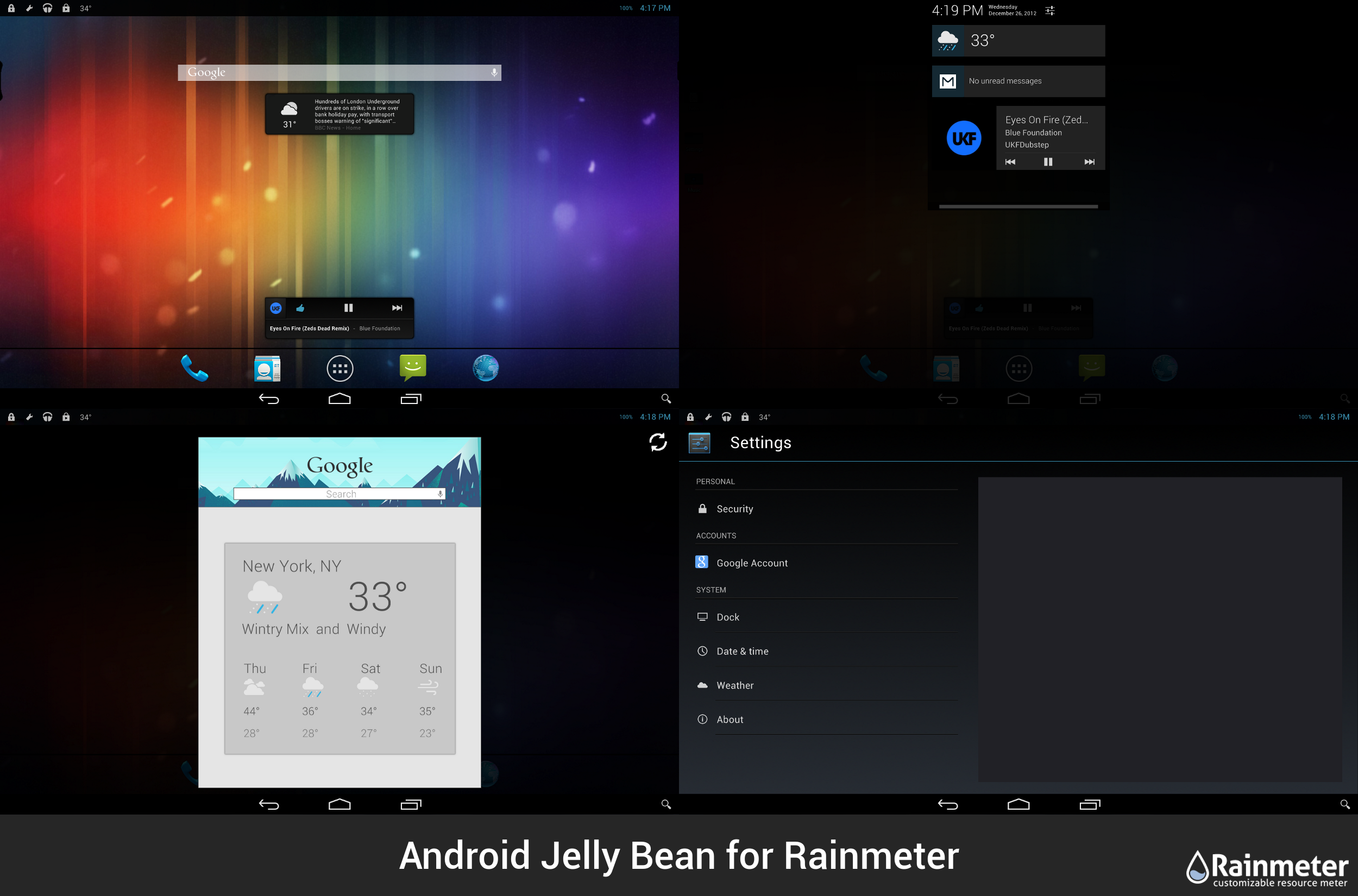
Android Jelly Bean for Rainmeter V1.0.5
--------------------------------------------------------
NOTE: WINDOWS XP AND ABOVE! (SOME FEATURES ARE WINDOWS 7 AND ABOVE ONLY)
--------------------------------------------------------
--------------------------------------------------------
NOTE: WINDOWS XP AND ABOVE! (SOME FEATURES ARE WINDOWS 7 AND ABOVE ONLY)
--------------------------------------------------------
PLEASE CHECK OUT ANDROID KITKAT FOR RAINMETER! 
--------------------------------------------------------
Guys, please, please, PLEASE thank ~CodyMacri for resizing this skin! This current version (should) work(s) on large 16:9 and 16:10 resolutions, but ~CodyMacri has resized the skin to fit smaller screens. Check them out!
1024x768 Version
1280x800 Version
1366x768 Version
--------------------------------------------------------
CHANGELOG
--------------------------------------------------------
1/21/13 (Jan. 13) V1.0.5
- Slight tweaks here and there
- Added digital clock widget
1/13/13 (Jan. 13) V1.0.2
- Added "sideways" apps dock
- Full "sideways" orientation allowed (sideways Google Search, dock seperator and apps dock)
1/5/13 (Jan. 5) V1.0.1
- Changed dock settings so that you can just type the icon name and not the whole path and file type
- Changed soft keys double click actions; changes noted on tooltips
- "MouseLeaveActions" have been added to soft keys menu and quick menu; move mouse away from the menu and it will close itself, instead of you having to click the toggler
- Fixed position bugs in Google Now and News and Weather skins: users living in locations with long names shouldn't experience temperatures and icons overlapping random areas
- Revamped Widgets drawer to actually show widgets
- Added carrier names to parts of skin (default is Verizon)
- Added new BBC News widgets in 2 variants
- Added new Tumblr Quick Post widget
- Added new customizable sticky note (can change font color and note color)
- Added new Photo Gallery widget
- Fixed Analog Clock Widget
- Replaced wallpaper #20 with Nexus 4 default wallpaper
- Added "Miscellaneous Settings" skin, can be accessed from regular settings skin
- Misc. Settings skin allows you to change carrier names, use a custom image for the lock screen, and use a music player other than iTunes
--------------------------------------------------------
PACKAGE FEATURES
--------------------------------------------------------
- Status Bar with notifications pane and quick menu pane
- Status bar/notifications notify you about weather and Gmail
- Soft Keys with working back, home and menu buttons
- Customizable apps dock that launches the apps drawer
- Apps drawer that contains 40 link and apps
- Google Now replica (background that syncs with your local time causing the sky to change)
- Google Play Music replica that works with iTunes and AIMP3
- Google Play Store replica
- Settings menu that customizes almost everything
- Fully functioning lock screen that "turns off" the screen
- Analog Clock widget (buggy)
- Google Play Music widget
- Google Search bar with 8 different color and style variations
- News and Weather widget
- Comes with 20 wallpapers to choose from
- Volume Rocker skin that raises/lowers volume
- Power button that "turns off" screen and can reboot/shutdown PC
- Parody of JB's easter egg (if you know how to find it on a phone/tablet, you'll know how to find it on the skin)
- EASY TO USE SETUP SKIN AT FIRST LAUNCH
- PDF file which has an FAQ
--------------------------------------------------------
CREDITS
--------------------------------------------------------
- Alex Becherer (Rainmeter Forums)
- Android/Google (LOVE YOU GUYS <3<3<3)
- Chrome Underground
- JSMorley (Rainmeter Profile)
- Kaelri (Rainmeter Profile)
- Nizi652 (XDA Developers)
- Smurfier (Rainmeter Profile)
- Waftsheasel (TurboDuck Profile)
- SacTappingUnicorn (TurboDuck Profile)
--------------------------------------------------------
NOTE: WINDOWS XP AND ABOVE! (SOME FEATURES ARE WINDOWS 7 AND ABOVE ONLY)
--------------------------------------------------------
I am in no way related to Android or Google. They did not pay me, I do not work for them. I am just a huge fan.
--------------------------------------------------------
Guys, please, please, PLEASE thank ~CodyMacri for resizing this skin! This current version (should) work(s) on large 16:9 and 16:10 resolutions, but ~CodyMacri has resized the skin to fit smaller screens. Check them out!
1024x768 Version
1280x800 Version
1366x768 Version
--------------------------------------------------------
CHANGELOG
--------------------------------------------------------
1/21/13 (Jan. 13) V1.0.5
- Slight tweaks here and there
- Added digital clock widget
1/13/13 (Jan. 13) V1.0.2
- Added "sideways" apps dock
- Full "sideways" orientation allowed (sideways Google Search, dock seperator and apps dock)
1/5/13 (Jan. 5) V1.0.1
- Changed dock settings so that you can just type the icon name and not the whole path and file type
- Changed soft keys double click actions; changes noted on tooltips
- "MouseLeaveActions" have been added to soft keys menu and quick menu; move mouse away from the menu and it will close itself, instead of you having to click the toggler
- Fixed position bugs in Google Now and News and Weather skins: users living in locations with long names shouldn't experience temperatures and icons overlapping random areas
- Revamped Widgets drawer to actually show widgets
- Added carrier names to parts of skin (default is Verizon)
- Added new BBC News widgets in 2 variants
- Added new Tumblr Quick Post widget
- Added new customizable sticky note (can change font color and note color)
- Added new Photo Gallery widget
- Fixed Analog Clock Widget
- Replaced wallpaper #20 with Nexus 4 default wallpaper
- Added "Miscellaneous Settings" skin, can be accessed from regular settings skin
- Misc. Settings skin allows you to change carrier names, use a custom image for the lock screen, and use a music player other than iTunes
--------------------------------------------------------
PACKAGE FEATURES
--------------------------------------------------------
- Status Bar with notifications pane and quick menu pane
- Status bar/notifications notify you about weather and Gmail
- Soft Keys with working back, home and menu buttons
- Customizable apps dock that launches the apps drawer
- Apps drawer that contains 40 link and apps
- Google Now replica (background that syncs with your local time causing the sky to change)
- Google Play Music replica that works with iTunes and AIMP3
- Google Play Store replica
- Settings menu that customizes almost everything
- Fully functioning lock screen that "turns off" the screen
- Analog Clock widget (buggy)
- Google Play Music widget
- Google Search bar with 8 different color and style variations
- News and Weather widget
- Comes with 20 wallpapers to choose from
- Volume Rocker skin that raises/lowers volume
- Power button that "turns off" screen and can reboot/shutdown PC
- Parody of JB's easter egg (if you know how to find it on a phone/tablet, you'll know how to find it on the skin)
- EASY TO USE SETUP SKIN AT FIRST LAUNCH
- PDF file which has an FAQ
--------------------------------------------------------
CREDITS
--------------------------------------------------------
- Alex Becherer (Rainmeter Forums)
- Android/Google (LOVE YOU GUYS <3<3<3)
- Chrome Underground
- JSMorley (Rainmeter Profile)
- Kaelri (Rainmeter Profile)
- Nizi652 (XDA Developers)
- Smurfier (Rainmeter Profile)
- Waftsheasel (TurboDuck Profile)
- SacTappingUnicorn (TurboDuck Profile)
--------------------------------------------------------
NOTE: WINDOWS XP AND ABOVE! (SOME FEATURES ARE WINDOWS 7 AND ABOVE ONLY)
--------------------------------------------------------
I am in no way related to Android or Google. They did not pay me, I do not work for them. I am just a huge fan.
--------------------------------------------------------
PLEASE CHECK OUT ANDROID KITKAT FOR RAINMETER!
--------------------------------------------------------
Comments147
Join the community to add your comment. Already a deviant? Log In
would u mind texting the size of ur skins in description becauce they are genrally large